











Echo Live for Windows
- Free
- 4.1
- V1.3.3
Free Download for Windows
View an ad to download for free

- Escalera Labs S.L.
Real-time AI voice changer, custom voice effects, soundboard and text-to-speech
Echo Live is a real-time AI voice changer, voice-effects editor and soundboard for gaming, streaming and voice chat. Explore different voices, create your own effect combinations and play sound clips alongside your microphone audio. The desktop app also includes text-to-speech for creating spoken clips.
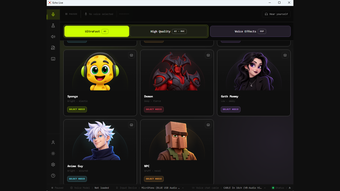
AI voices for live conversations
Explore community AI voices and the app's UltraFast and High Quality voice options. Use Echo Live during gaming sessions, Discord conversations and streams after configuring the appropriate audio route. Real-time voice processing runs locally on your computer; performance depends on your hardware and the selected voice or processing mode.
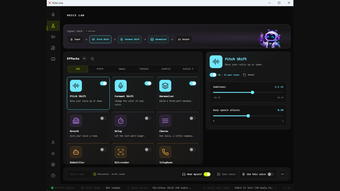
Build custom effects in Voice Lab
Combine effects in a signal chain and adjust their settings to shape your voice. Controls include pitch and formant shifting, harmonizer, reverb and delay. Save custom voices and switch between creative effects for different conversations or streams.
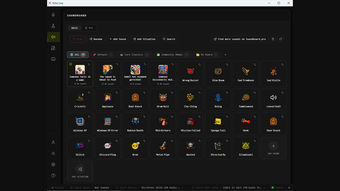
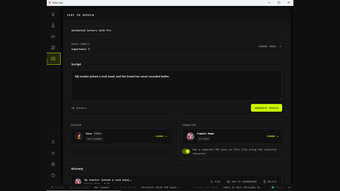
Soundboard and text-to-speech
Play built-in sounds, import clips, organize boards and use keyboard shortcuts to trigger sounds. Situations group sounds for recurring moments during games or broadcasts. Generate spoken clips from text using downloadable speech models, choose voices and replay previous results. Speech-language availability depends on the selected model and is separate from the app's interface language.
Setup, languages and availability
Guided setup helps you sign in, configure your microphone and try your first voice. A free Echo account is required. Use headphones for monitoring and configure the output or virtual audio route needed by your chat or streaming application.
The interface offers English, German, Spanish, French, Portuguese, Japanese, Korean, Traditional Chinese, Simplified Chinese, Polish, Russian, Italian and Turkish. Some newer interface text may fall back to English.
This listing provides Echo Live 1.3.3 for Windows 10 and Windows 11 on x64 PCs. An Apple Silicon Mac version is available separately from the official website. Echo Live has a free version with optional paid Pro features; feature access and usage limits depend on your plan. See the official website for current downloads, pricing and setup guidance.
Loading…
App specs
Developer
- Escalera Labs S.L.
License
Free
Version
1.3.3
Latest update
Platform
Windows
OS
Windows 11
Language
English
Available languages
- Spanish
- English
- French
- German
- Italian
- Portuguese
- Russian
- Polish
- Chinese
- Turkish
- Korean
- Japanese
Size
90.60 MB
Echo Live for PC
- Free
- 4.1
- V1.3.3
Free Download for PC
View an ad to download for free
User reviews about Echo Live
Have you tried Echo Live? Be the first to leave your opinion!
Add reviewTop downloads Audio for Windows
Top downloads Audio for Windows
Top downloads Audio for Windows
Related topics about Echo Live
Latest articles

Undead Labs leaves Xbox: State of Decay studio goes independent again amid layoffs
Apple CarPlay is more customizable now: change these settings

GTA 6’s November launch could hurt the NBA and NFL, says Steven Adams

Discord rolls out age verification worldwide this Wednesday

Apple TV+ orders Neuromancer: 10-episode series now official
Laws concerning the use of this software vary from country to country. We do not encourage or condone the use of this program if it is in violation of these laws. Softonic may receive a referral fee if you click or buy any of the products featured here.